
A posting schedule controls automatic drafting for one brand. Moosen creates the first schedule during setup.
Open the schedule#
- Open Settings.
- Find Automation → Posting schedules.
- Check the brand name on the schedule you want to change.
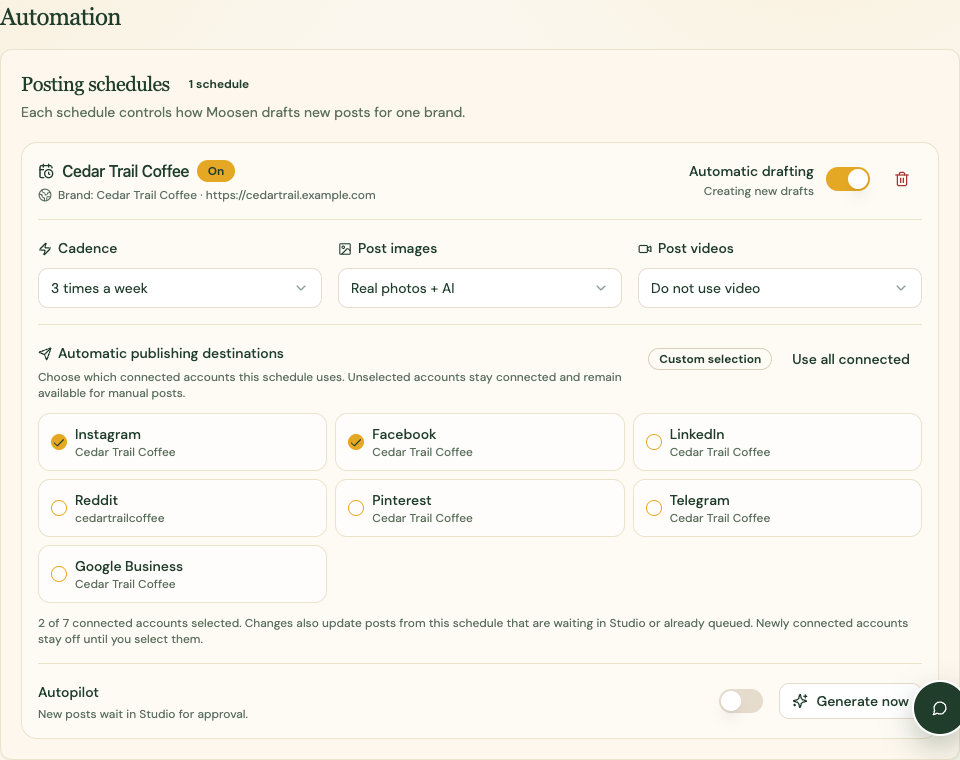
Choose cadence and media#
Use Cadence to choose Daily, 5 times a week, 3 times a week, 2 times a week, Weekly, Every other week, or Monthly.
Under Post images, choose Real photos + AI, Website photos only, or AI-generated only. Under Post videos, choose whether to use website videos.
These settings control future drafting. Use Calendar to change an individual post's time.
Select destinations#
Under Automatic publishing destinations, select the connected accounts this schedule should use. Review the option for automatically including newly connected accounts before enabling it.
Accounts you leave unselected stay connected and remain available in the manual composer.
Turn drafting on or off#
Use Automatic drafting to stop or resume new drafts for that schedule. Turning drafting off doesn't remove posts that are already scheduled.
Use the schedule's generate control if you need new drafts and your plan and schedule allow it. If Moosen says a run is already in progress or the brand is refreshing, wait for that work to finish.
Review multiple schedules#
If more than one schedule is attached to the same brand, each active schedule drafts independently. Review each one to avoid a higher cadence than intended.
The delete control removes a schedule after confirmation. Read the confirmation and inspect already queued content separately.
See autopilot for the control that publishes new drafts without review.